

実験的 API: この API は実験的であり、変更される可能性があります。エンドポイント、リクエスト/レスポンス形式、および動作は予告なく変更される場合があります。
Comfy Cloud API
Comfy Cloud API は、Comfy Cloud インフラストラクチャ上でワークフローを実行するためのプログラムによるアクセスを提供します。この API はローカルの ComfyUI の API と互換性があり、既存の統合を簡単に移行できます。サブスクリプションが必要: API を介してワークフローを実行するには、有効な Comfy Cloud サブスクリプションが必要です。詳細は料金プランをご覧ください。
ベース URL
https://cloud.comfy.org
認証
すべての API リクエストには、X-API-Key ヘッダーを介して API キーを渡す必要があります。
API キーの取得
1
Visit https://platform.comfy.org/login and Log In
Please visit https://platform.comfy.org/login and log in with the corresponding account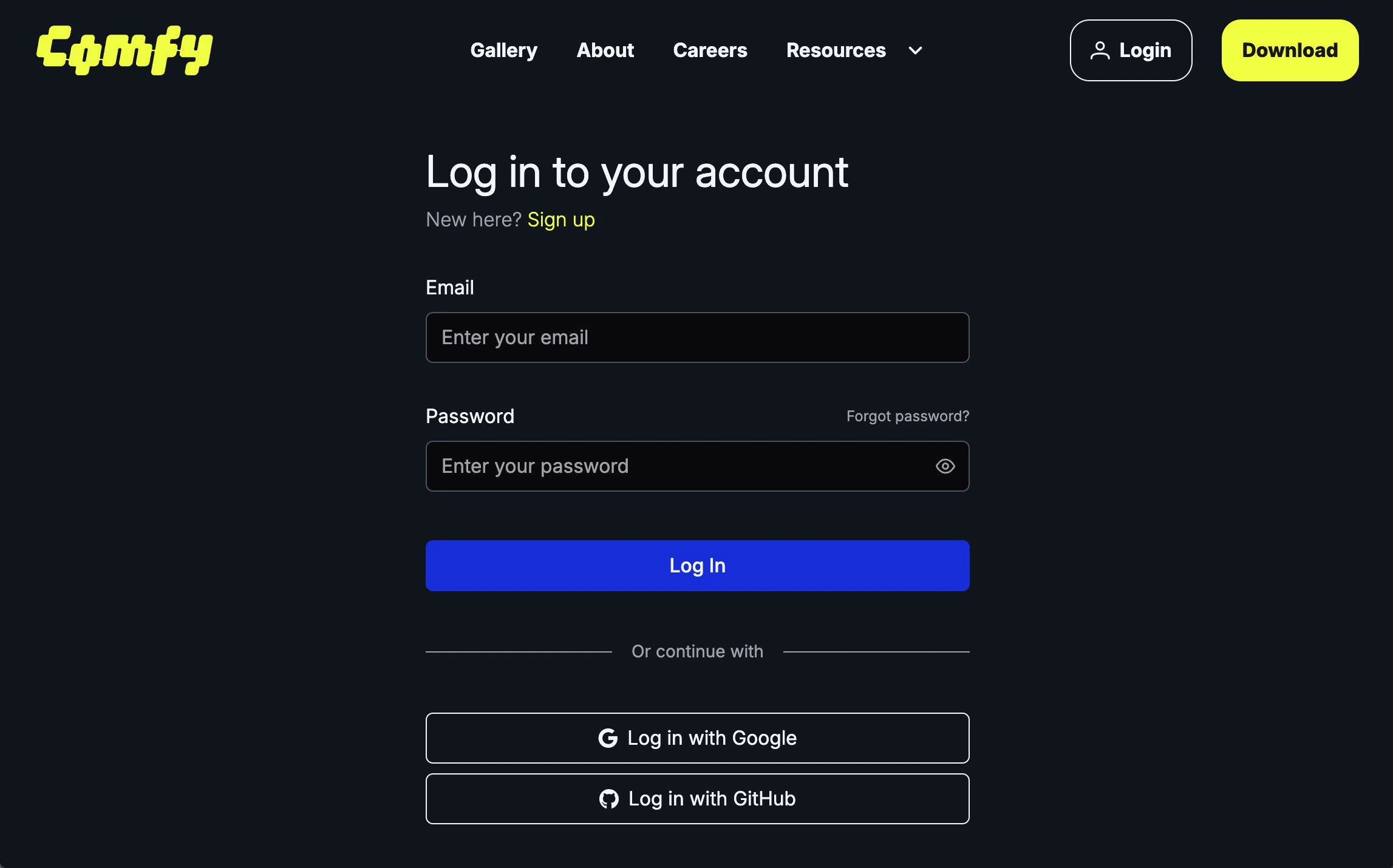
2
Click `+ New` in API Keys to Create an API Key
Click 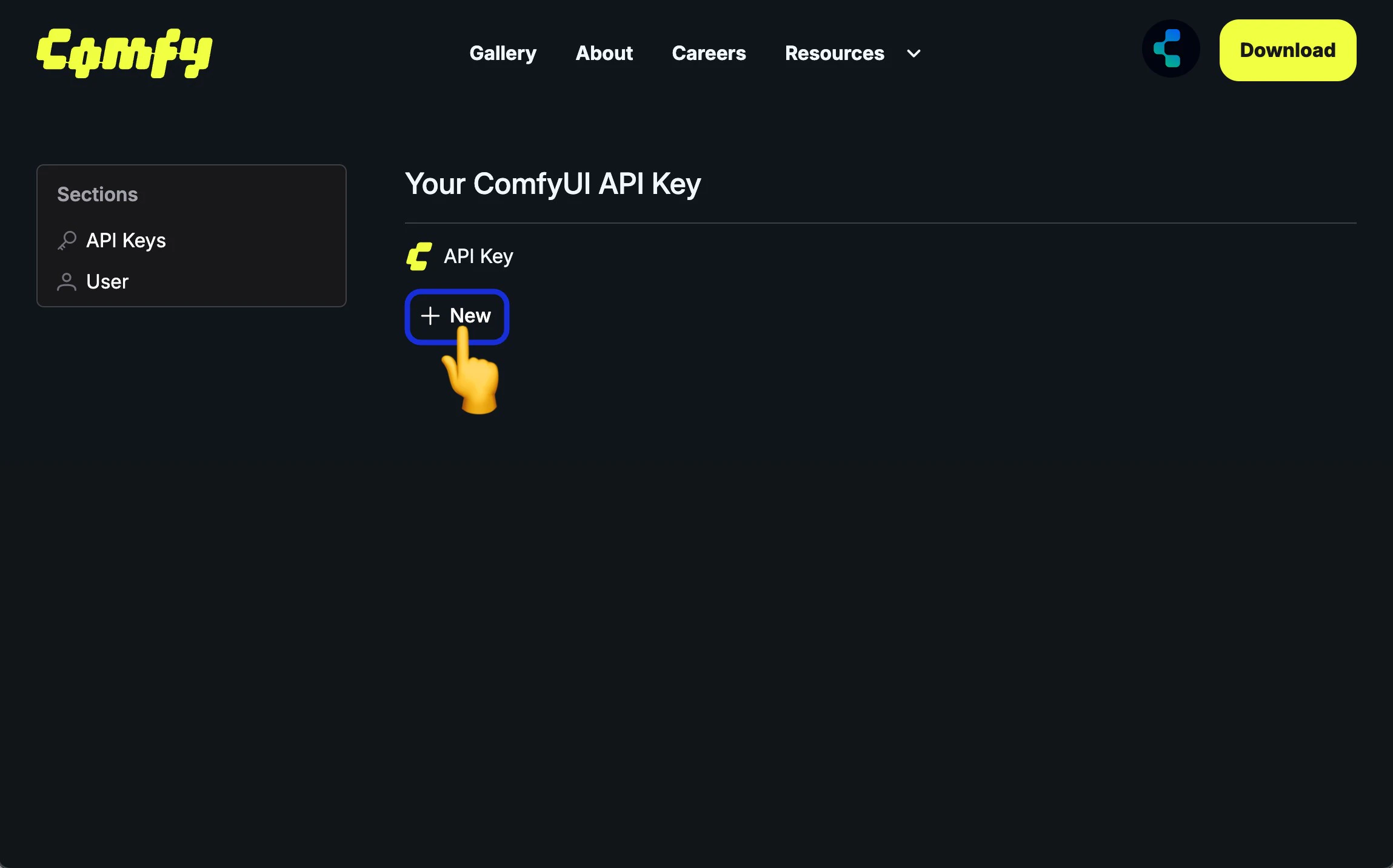
+ New in API Keys to create an API Key3
Enter API Key Name
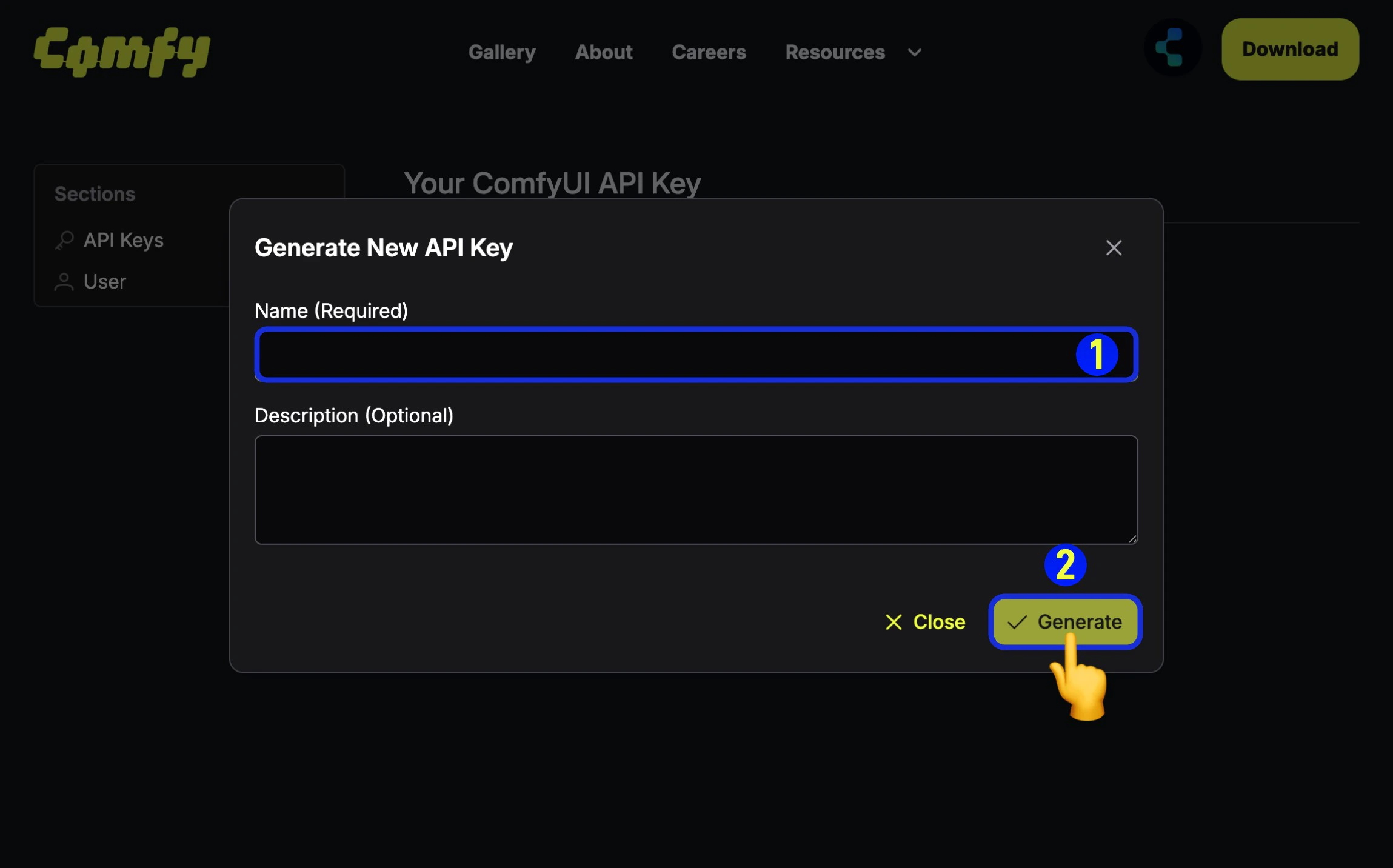
- (Required) Enter the API Key name,
- Click
Generateto create
4
Save the Obtained API Key
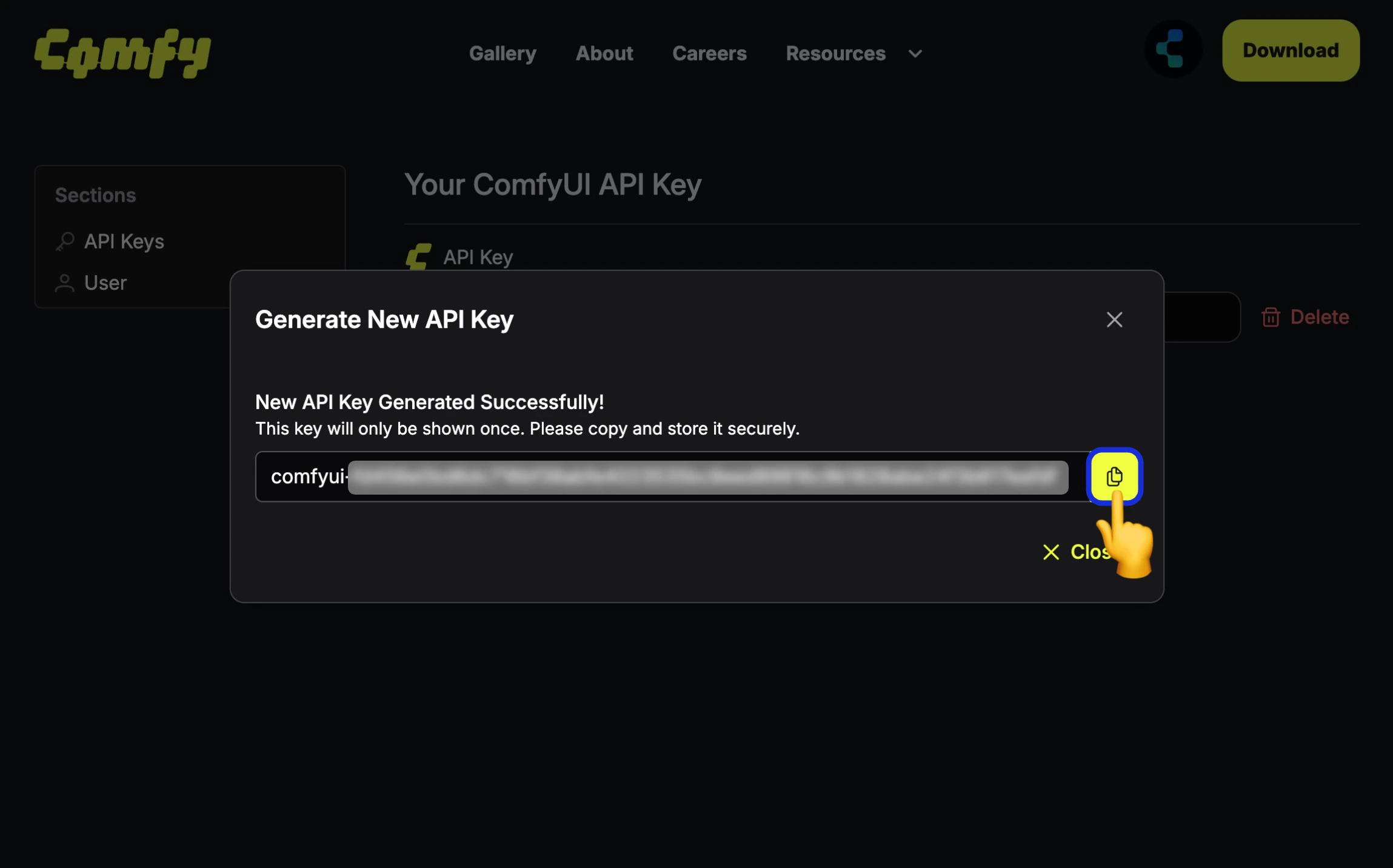
Since the API Key is only visible upon first creation, please save it immediately after creation. It cannot be viewed later, so please keep it safe.
Please note that you should not share your API Key with others. Once it leaked, you can delete it and create a new one.
API キーは安全に保管してください。バージョン管理システムにコミットしたり、公開で共有したりしないでください。
API キーの使用
すべてのリクエストでX-API-Key ヘッダーに API キーを渡します:
curl -X GET "https://cloud.comfy.org/api/user" \
  -H "X-API-Key: $COMFY_CLOUD_API_KEY"
const API_KEY = process.env.COMFY_CLOUD_API_KEY!;

const response = await fetch("https://cloud.comfy.org/api/user", {
  headers: { "X-API-Key": API_KEY },
});
const user = await response.json();
import os
import requests

API_KEY = os.environ["COMFY_CLOUD_API_KEY"]
headers = {"X-API-Key": API_KEY}

response = requests.get(
    "https://cloud.comfy.org/api/user",
    headers=headers
)
核心概念
ワークフロー
ComfyUI ワークフローは、ノードのグラフを記述する JSON オブジェクトです。API は「API 形式」のワークフローを受け付けます(ノード ID をキーとし、class_type、inputs などを含む)。この形式は、ComfyUI フロントエンドの「Save (API Format)」オプションによって生成されます。ジョブ
ワークフローを送信すると、ジョブが作成されます。ジョブは非同期で実行されます:POST /api/promptを介してワークフローを送信prompt_id(ジョブ ID)を受け取る- WebSocket を介して進捗を監視するか、ステータスをポーリング
- 完了時に出力を取得
並列実行(同時ジョブ)
API ユーザーは、前のジョブの完了を待たずに、複数のワークフローを同時に送信できます。複数のPOST /api/prompt リクエストを送信するだけです。特別なヘッダーやパラメーターは必要ありません。ディスパッチャーは、サブスクリプションティアの制限まで、それらを並列で実行します。
| サブスクリプションティア | 同時ジョブ数 |
|---|---|
| Free | 1 |
| Standard | 1 |
| Creator | 3 |
| Pro | 5 |
並列実行は現在、API を介してのみ利用可能です。サブスクリプションの詳細は料金プランをご覧ください。
例:複数のジョブを並列で送信
import os
import json
import asyncio
import aiohttp

BASE_URL = "https://cloud.comfy.org"
API_KEY = os.environ["COMFY_CLOUD_API_KEY"]

async def submit_workflow(session, workflow):
    """単一のワークフローを送信し、prompt_id を返します。"""
    async with session.post(
        f"{BASE_URL}/api/prompt",
        headers={"X-API-Key": API_KEY, "Content-Type": "application/json"},
        json={"prompt": workflow},
    ) as response:
        result = await response.json()
        return result["prompt_id"]

async def main():
    with open("workflow_api.json") as f:
        base_workflow = json.load(f)

    # シードを変更してバリエーションを作成
    workflows = []
    for seed in [42, 123, 456]:
        workflow = json.loads(json.dumps(base_workflow))
        workflow["3"]["inputs"]["seed"] = seed
        workflows.append(workflow)

    # すべてのワークフローを同時に送信
    async with aiohttp.ClientSession() as session:
        prompt_ids = await asyncio.gather(
            *[submit_workflow(session, wf) for wf in workflows]
        )

    for pid in prompt_ids:
        print(f"Job submitted: {pid}")

    # 各ジョブをポーリングまたは WebSocket で監視...

asyncio.run(main())
const BASE_URL = "https://cloud.comfy.org";
const API_KEY = process.env.COMFY_CLOUD_API_KEY!;

async function submitWorkflow(
  workflow: Record<string, any>
): Promise<string> {
  const response = await fetch(`${BASE_URL}/api/prompt`, {
    method: "POST",
    headers: { "X-API-Key": API_KEY, "Content-Type": "application/json" },
    body: JSON.stringify({ prompt: workflow }),
  });
  if (!response.ok) throw new Error(`HTTP ${response.status}`);
  return (await response.json()).prompt_id;
}

async function main() {
  const base = JSON.parse(
    await Deno.readTextFile("workflow_api.json")
  );

  # シードを変更してバリエーションを作成
  const seeds = [42, 123, 456];
  const workflows = seeds.map((seed) => {
    const wf = structuredClone(base);
    wf["3"].inputs.seed = seed;
    return wf;
  });

  # すべてのワークフローを同時に送信
  const promptIds = await Promise.all(
    workflows.map((wf) => submitWorkflow(wf))
  );

  for (const pid of promptIds) {
    console.log(`Job submitted: {pid}`);
  }

  # 各ジョブをポーリングまたは WebSocket で監視...
}

main();
出力
生成されたコンテンツ(画像、動画、音声)はクラウドストレージに保存されます。出力ファイルは/api/view エンドポイントを介してダウンロードできます。このエンドポイントは、一時署名付き URL への 302 リダイレクトを返します。
クイックスタート
ワークフローの送信、進捗の監視、出力の取得方法を示す完全な例を以下に示します:ステップ 1:ワークフローの送信
curl -X POST "https://cloud.comfy.org/api/prompt" \
  -H "X-API-Key: $COMFY_CLOUD_API_KEY" \
  -H "Content-Type: application/json" \
  -d '{"prompt": '"$(cat workflow_api.json)"'}'
const BASE_URL = "https://cloud.comfy.org";
const API_KEY = process.env.COMFY_CLOUD_API_KEY!;

# ワークフローを読み込む(ComfyUI から API 形式でエクスポート)
const workflow = JSON.parse(await Deno.readTextFile("workflow_api.json"));

# ワークフローを送信
const response = await fetch(`${BASE_URL}/api/prompt`, {
  method: "POST",
  headers: { "X-API-Key": API_KEY, "Content-Type": "application/json" },
  body: JSON.stringify({ prompt: workflow }),
});
const result = await response.json();
const promptId = result.prompt_id;
console.log(`Job submitted: {promptId}`);
import os
import requests
import json

BASE_URL = "https://cloud.comfy.org"
API_KEY = os.environ["COMFY_CLOUD_API_KEY"]

def get_headers():
    return {"X-API-Key": API_KEY, "Content-Type": "application/json"}

# ワークフローを読み込む(ComfyUI から API 形式でエクスポート)
with open("workflow_api.json") as f:
    workflow = json.load(f)

# ワークフローを送信
response = requests.post(
    f"{BASE_URL}/api/prompt",
    headers=get_headers(),
    json={"prompt": workflow}
)
result = response.json()
prompt_id = result["prompt_id"]
print(f"Job submitted: {prompt_id}")
ステップ 2:ジョブの進捗を監視
ポーリングまたは WebSocket を使用して、ジョブの完了を監視できます。オプション A:ポーリング(シンプル)
Job Status Values: The API returns one of the following status values:| Status | Description |
|---|---|
pending | Job is queued and waiting to start |
in_progress | Job is currently executing |
completed | Job finished successfully |
failed | Job encountered an error |
cancelled | Job was cancelled by user |
# Poll for job completion
curl -X GET "$BASE_URL/api/job/{prompt_id}/status" \
  -H "X-API-Key: $COMFY_CLOUD_API_KEY"

# Response examples:
# {"status": "pending"}      - Job is queued
# {"status": "in_progress"}  - Job is currently running
# {"status": "completed"}    - Job finished successfully
# {"status": "failed"}       - Job encountered an error
# {"status": "cancelled"}    - Job was cancelled
interface JobStatus {
  status: string;
}

async function getJobStatus(promptId: string): Promise<JobStatus> {
  const response = await fetch(`${BASE_URL}/api/job/${promptId}/status`, {
    headers: getHeaders(),
  });
  if (!response.ok) throw new Error(`HTTP ${response.status}`);
  return response.json();
}

async function pollForCompletion(
  promptId: string,
  timeout: number = 300,
  pollInterval: number = 2000
): Promise<void> {
  const startTime = Date.now();

  while (Date.now() - startTime < timeout * 1000) {
    const { status } = await getJobStatus(promptId);

    if (status === "completed") {
      return;
    } else if (["failed", "cancelled"].includes(status)) {
      throw new Error(`Job failed with status: ${status}`);
    }

    await new Promise((resolve) => setTimeout(resolve, pollInterval));
  }

  throw new Error(`Job ${promptId} did not complete within ${timeout}s`);
}

await pollForCompletion(promptId);
console.log("Job completed!");
def get_job_status(prompt_id: str) -> str:
    """Get the current status of a job."""
    response = requests.get(
        f"{BASE_URL}/api/job/{prompt_id}/status",
        headers=get_headers()
    )
    response.raise_for_status()
    return response.json()["status"]

def poll_for_completion(prompt_id: str, timeout: int = 300, poll_interval: float = 2.0) -> None:
    """Poll until job completes or times out."""
    start_time = time.time()

    while time.time() - start_time < timeout:
        status = get_job_status(prompt_id)

        if status == "completed":
            return
        elif status in ("failed", "cancelled"):
            raise RuntimeError(f"Job failed with status: {status}")

        time.sleep(poll_interval)

    raise TimeoutError(f"Job {prompt_id} did not complete within {timeout}s")

poll_for_completion(prompt_id)
print("Job completed!")
オプション B:WebSocket(リアルタイム進捗)
リアルタイムの進捗更新と出力メタデータの収集には:async function listenForCompletion(
promptId: string,
timeout: number = 300000
): Promise<Record<string, any>> {
const wsUrl = `wss://cloud.comfy.org/ws?clientId=${crypto.randomUUID()}&token=${API_KEY}`;
const outputs: Record<string, any> = {};
return new Promise((resolve, reject) => {
const ws = new WebSocket(wsUrl);
const timer = setTimeout(() => {
ws.close();
reject(new Error(`Job did not complete within ${timeout / 1000}s`));
}, timeout);
ws.onmessage = (event) => {
const data = JSON.parse(event.data);
const msgType = data.type;
const msgData = data.data ?? {};
// Filter to our job
if (msgData.prompt_id !== promptId) return;
if (msgType === "executing") {
const node = msgData.node;
if (node) {
console.log(`Executing node: ${node}`);
} else {
console.log("Execution complete");
}
} else if (msgType === "progress") {
console.log(`Progress: ${msgData.value}/${msgData.max}`);
} else if (msgType === "executed" && msgData.output) {
outputs[msgData.node] = msgData.output;
} else if (msgType === "execution_success") {
console.log("Job completed successfully!");
clearTimeout(timer);
ws.close();
resolve(outputs);
} else if (msgType === "execution_error") {
const errorMsg = msgData.exception_message ?? "Unknown error";
clearTimeout(timer);
ws.close();
reject(new Error(`Execution error: ${errorMsg}`));
}
};
ws.onerror = (err) => {
clearTimeout(timer);
reject(err);
};
});
}
// Wait for completion and collect outputs
const outputs = await listenForCompletion(promptId);
import asyncio
import aiohttp
import json
import uuid

async def listen_for_completion(prompt_id: str, timeout: float = 300.0) -> dict:
    """Connect to WebSocket and listen for job completion.

    Returns:
        Final outputs from the job
    """
    ws_url = BASE_URL.replace("https://", "wss://")
    client_id = str(uuid.uuid4())
    ws_url = f"{ws_url}/ws?clientId={client_id}&token={API_KEY}"

    outputs = {}

    async with aiohttp.ClientSession() as session:
        async with session.ws_connect(ws_url) as ws:
            async def receive_messages():
                async for msg in ws:
                    if msg.type == aiohttp.WSMsgType.TEXT:
                        data = json.loads(msg.data)
                        msg_type = data.get("type")
                        msg_data = data.get("data", {})

                        # Filter to our job
                        if msg_data.get("prompt_id") != prompt_id:
                            continue

                        if msg_type == "executing":
                            node = msg_data.get("node")
                            if node:
                                print(f"Executing node: {node}")

                        elif msg_type == "progress":
                            value = msg_data.get("value", 0)
                            max_val = msg_data.get("max", 100)
                            print(f"Progress: {value}/{max_val}")

                        elif msg_type == "executed":
                            node_id = msg_data.get("node")
                            output = msg_data.get("output", {})
                            if output:
                                outputs[node_id] = output

                        elif msg_type == "execution_success":
                            print("Job completed successfully!")
                            return outputs

                        elif msg_type == "execution_error":
                            error_msg = msg_data.get("exception_message", "Unknown error")
                            raise RuntimeError(f"Execution error: {error_msg}")

                    elif msg.type == aiohttp.WSMsgType.ERROR:
                        raise RuntimeError(f"WebSocket error: {ws.exception()}")

            try:
                return await asyncio.wait_for(receive_messages(), timeout=timeout)
            except asyncio.TimeoutError:
                raise TimeoutError(f"Job did not complete within {timeout}s")

# Wait for completion and collect outputs
outputs = await listen_for_completion(prompt_id)
詳細なメッセージタイプとバイナリプレビュー画像の処理については、WebSocket リファレンスをご覧ください。
ステップ 3:出力のダウンロード
ジョブが完了したら、生成されたファイルをダウンロードします。WebSocket から返されるoutputs オブジェクト(または履歴エンドポイントを介して利用可能)には、ノード ID ごとに整理された出力データが含まれています。各ノードの出力には、ファイルメタデータを含む images、video、または audio 配列が含まれる場合があります。
出力構造の例:
{
  "9": {
    "images": [
      {
        "filename": "ComfyUI_00001_.png",
        "subfolder": "",
        "type": "output"
      }
    ]
  }
}
"9")は、ワークフロー内の SaveImage または他の出力ノードに対応します。これらの ID は、ワークフロー JSON ファイルを開き、class_type が SaveImage、VHS_VideoCombine などのノードを探すことで見つけることができます。
# Download a single output file (follow 302 redirect with -L)
curl -L "$BASE_URL/api/view?filename=output.png&subfolder=&type=output" \
  -H "X-API-Key: $COMFY_CLOUD_API_KEY" \
  -o output.png
async function downloadOutput(
  filename: string,
  subfolder: string = "",
  outputType: string = "output"
): Promise<ArrayBuffer> {
  const params = new URLSearchParams({ filename, subfolder, type: outputType });
  // Get the redirect URL
  const response = await fetch(`${BASE_URL}/api/view?${params}`, {
    headers: { "X-API-Key": API_KEY },
    redirect: "manual",
  });
  if (response.status !== 302) throw new Error(`HTTP ${response.status}`);
  const signedUrl = response.headers.get("location")!;

  // Fetch from signed URL
  const fileResponse = await fetch(signedUrl);
  if (!fileResponse.ok) throw new Error(`HTTP ${fileResponse.status}`);
  return fileResponse.arrayBuffer();
}

async function saveOutputs(
  outputs: Record<string, any>,
  outputDir: string = "."
): Promise<void> {
  for (const nodeOutputs of Object.values(outputs)) {
    for (const key of ["images", "video", "audio"]) {
      for (const fileInfo of (nodeOutputs as any)[key] ?? []) {
        const data = await downloadOutput(
          fileInfo.filename,
          fileInfo.subfolder ?? "",
          fileInfo.type ?? "output"
        );
        const path = `${outputDir}/${fileInfo.filename}`;
        await writeFile(path, Buffer.from(data));
        console.log(`Saved: ${path}`);
      }
    }
  }
}

// Download all outputs
await saveOutputs(outputs, "./my_outputs");
def download_output(filename: str, subfolder: str = "", output_type: str = "output") -> bytes:
    """Download an output file.

    Args:
        filename: Name of the file
        subfolder: Subfolder path (usually empty)
        output_type: "output" for final outputs, "temp" for previews

    Returns:
        File bytes
    """
    params = {
        "filename": filename,
        "subfolder": subfolder,
        "type": output_type
    }

    response = requests.get(
        f"{BASE_URL}/api/view",
        headers=get_headers(),
        params=params
    )
    response.raise_for_status()
    return response.content

def save_outputs(outputs: dict, output_dir: str = "."):
    """Save all outputs from a job to disk.

    Args:
        outputs: Outputs dict from job (node_id -> output_data)
        output_dir: Directory to save files to
    """
    import os
    os.makedirs(output_dir, exist_ok=True)

    for node_id, node_outputs in outputs.items():
        for key in ("images", "video", "audio"):
            for file_info in node_outputs.get(key, []):
                filename = file_info["filename"]
                subfolder = file_info.get("subfolder", "")
                output_type = file_info.get("type", "output")

                data = download_output(filename, subfolder, output_type)

                output_path = os.path.join(output_dir, filename)
                with open(output_path, "wb") as f:
                    f.write(data)
                print(f"Saved: {output_path}")

# Download all outputs
save_outputs(outputs, "./my_outputs")
/api/view エンドポイントは、一時署名付き URL への 302 リダイレクトを返します。ファイルをダウンロードするには、HTTP クライアントがリダイレクトに従う必要があります。完全な例
以下は、3 つのすべてのステップを組み合わせた完全なエンドツーエンドの例です:import { readFile, writeFile } from "fs/promises";
const BASE_URL = "https://cloud.comfy.org";
const API_KEY = process.env.COMFY_CLOUD_API_KEY!;
async function main() {
// 1. Load and modify workflow
const workflow = JSON.parse(await readFile("workflow_api.json", "utf-8"));
workflow["3"].inputs.seed = 42;
workflow["6"].inputs.text = "a beautiful sunset";
// 2. Submit workflow
const response = await fetch(`${BASE_URL}/api/prompt`, {
method: "POST",
headers: { "X-API-Key": API_KEY, "Content-Type": "application/json" },
body: JSON.stringify({ prompt: workflow }),
});
const { prompt_id } = await response.json();
console.log(`Job submitted: ${prompt_id}`);
// 3. Poll for completion
while (true) {
const statusRes = await fetch(`${BASE_URL}/api/job/${prompt_id}/status`, {
headers: { "X-API-Key": API_KEY },
});
const { status } = await statusRes.json();
if (status === "completed") break;
if (["failed", "cancelled"].includes(status)) {
throw new Error(`Job ${status}`);
}
await new Promise((resolve) => setTimeout(resolve, 2000));
}
// 4. Get outputs via history endpoint
const historyRes = await fetch(`${BASE_URL}/api/history_v2/${prompt_id}`, {
headers: { "X-API-Key": API_KEY },
});
const history = await historyRes.json();
const outputs = history.outputs;
// 5. Download output files
for (const nodeOutputs of Object.values(outputs)) {
for (const fileInfo of (nodeOutputs as any).images ?? []) {
const params = new URLSearchParams({
filename: fileInfo.filename,
subfolder: fileInfo.subfolder ?? "",
type: "output",
});
const viewRes = await fetch(`${BASE_URL}/api/view?${params}`, {
headers: { "X-API-Key": API_KEY },
redirect: "manual",
});
const signedUrl = viewRes.headers.get("location")!;
const fileRes = await fetch(signedUrl);
await writeFile(`./${fileInfo.filename}`, Buffer.from(await fileRes.arrayBuffer()));
console.log(`Downloaded: ${fileInfo.filename}`);
}
}
}
main();
import os
import requests
import json
import time

BASE_URL = "https://cloud.comfy.org"
API_KEY = os.environ["COMFY_CLOUD_API_KEY"]

def main():
    # 1. Load and modify workflow
    with open("workflow_api.json") as f:
        workflow = json.load(f)

    workflow["3"]["inputs"]["seed"] = 42
    workflow["6"]["inputs"]["text"] = "a beautiful sunset"

    # 2. Submit workflow
    response = requests.post(
        f"{BASE_URL}/api/prompt",
        headers={"X-API-Key": API_KEY, "Content-Type": "application/json"},
        json={"prompt": workflow}
    )
    prompt_id = response.json()["prompt_id"]
    print(f"Job submitted: {prompt_id}")

    # 3. Poll for completion
    while True:
        status_res = requests.get(
            f"{BASE_URL}/api/job/{prompt_id}/status",
            headers={"X-API-Key": API_KEY}
        )
        status = status_res.json()["status"]

        if status == "completed":
            break
        if status in ("failed", "cancelled"):
            raise RuntimeError(f"Job {status}")
        time.sleep(2)

    # 4. Get outputs via history endpoint
    history_res = requests.get(
        f"{BASE_URL}/api/history_v2/{prompt_id}",
        headers={"X-API-Key": API_KEY}
    )
    history = history_res.json()
    outputs = history["outputs"]

    # 5. Download output files
    for node_outputs in outputs.values():
        for file_info in node_outputs.get("images", []):
            params = {
                "filename": file_info["filename"],
                "subfolder": file_info.get("subfolder", ""),
                "type": "output"
            }
            view_res = requests.get(
                f"{BASE_URL}/api/view",
                headers={"X-API-Key": API_KEY},
                params=params
            )
            with open(file_info["filename"], "wb") as f:
                f.write(view_res.content)
            print(f"Downloaded: {file_info['filename']}")

if __name__ == "__main__":
    main()
利用可能なエンドポイント
次のステップ
上記のクイックスタートでは、ワークフローの送信と結果の取得の基礎をカバーしています。より高度なユースケースについては、Cloud API リファレンスを参照してください:- 入力ファイルのアップロード - 外部入力を必要とするワークフローのために、画像、マスク、またはその他のユーザー提供コンテンツをアップロード
- ワークフロー入力の修正 - 送信前にプロンプト、シード、またはノード設定などのワークフローパラメーターを動的に変更
- パートナーノードの使用 - 追加の API キー設定を必要とする外部 AI サービス(Flux Pro、Ideogram など)を呼び出す
- キュー管理 - キューのステータスの監視、ジョブのキャンセル、または実行中の実行の中断
- エラー処理 - HTTP エラー、実行失敗の処理、および例外タイプの理解
- OpenAPI 仕様 - コード生成用の機械可読 API 仕様